Full Control with Scenario Settings
Take charge with Scenario Settings, offering a suite of customization options to align recommendations with your product vision.

Scenario
Each placement for recommendations, referred to as a Scenario, can be uniquely tailored to meet diverse needs. Here are a few examples of what you can create:
- New Releases For You: Present a curated selection from recently added content.
- Local Favorites: Highlight popular content from the user’s country or area.
- Category Highlights: Showcase personalized picks from the user's favorite category.
All these configurations can be easily managed through our intuitive Admin UI, making customization a breeze.
Let’s explore the individual options!
Logic
The Logic setting defines the ensemble of machine learning models applied to each specific Scenario.

We offer a diverse array of Logics, each fine-tuned for distinct use cases and tailored to particular domains. Selecting the right Logic is simple and ensures optimal performance for your needs.
For instance, you could choose a Logic designed for:
- Recommending Similar Products
- Optimizing "Watch-Next" Suggestions
- Curating a Personalized News Feed
Many of these Logics come with adjustable parameters, allowing you to fine-tune their behavior—for example, deciding whether to recommend content that users have already watched.
Filters
Filters enable you to specify which content or products are eligible for recommendations within a given Scenario.

For example, you can restrict recommendations to:
- Articles published within the last 7 days
- Promoted deals
- Apartments located within 10 miles of the user
- Kid-friendly content for minor users
Our library of predefined Filters addresses many common needs, allowing for immediate application. If you don’t find a specific filter in our library, you can easily create a custom one using our flexible ReQL language.
Like Logic and Boosters, Filters can also be passed via the API on a per-request basis, making them ideal for dynamic scenarios based on the user’s current selections.
Boosters
Boosters enable you to bias the recommendation engine toward your specific business goals.

For example, you can prioritize recommending:
- Newly added content
- Curated selections handpicked by editors
- Higher-end alternatives for upselling
- Deals tailored to the user’s location
Similar to Filters, we provide a library of predefined Boosters, and custom rules can be defined using ReQL.
Constraints
Constraints allow you to manage the diversity of recommended content or products effectively.
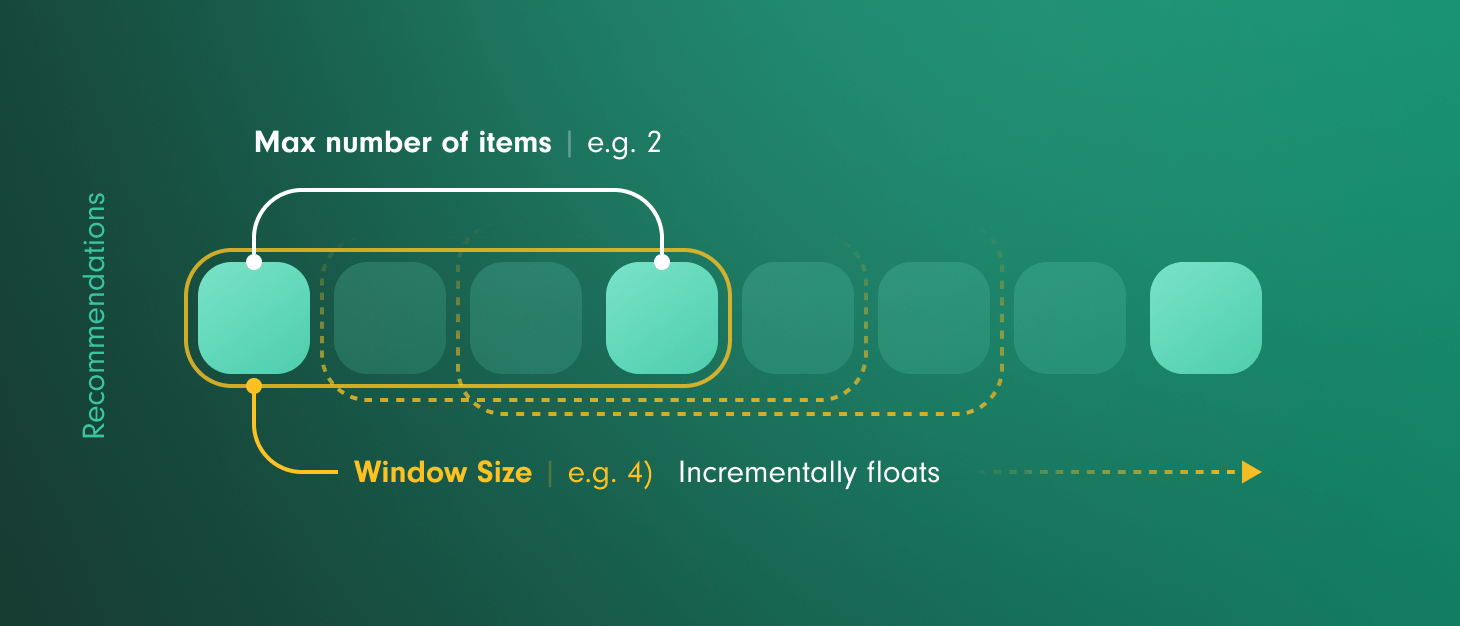
For example, you can set limits such as:
- No more than two items from each category
- No more than 50% of items from a single brand
- Only one product per parent product ID
A/B Testing
A/B Testing helps you validate changes to your recommendation strategy using real user behavior.
A/B Testing helps you validate changes to your recommendation strategy using real user behavior. Run an experiment within any Scenario and automatically split traffic between the current configuration—the Control—and one or more Variants.
Test different Logics and their settings, Filters, Boosters, and Constraints, then measure their impact on metrics such as Click-Through Rate, Conversion Rate, Watch Time, Revenue, or any custom metric defined in Insights analytics.
Clear reports show improvement over the Control, statistical significance, and the probability that each Variant will outperform the others—so you can roll out optimizations with confidence.